Should you build one cross-platform app or two native ones?
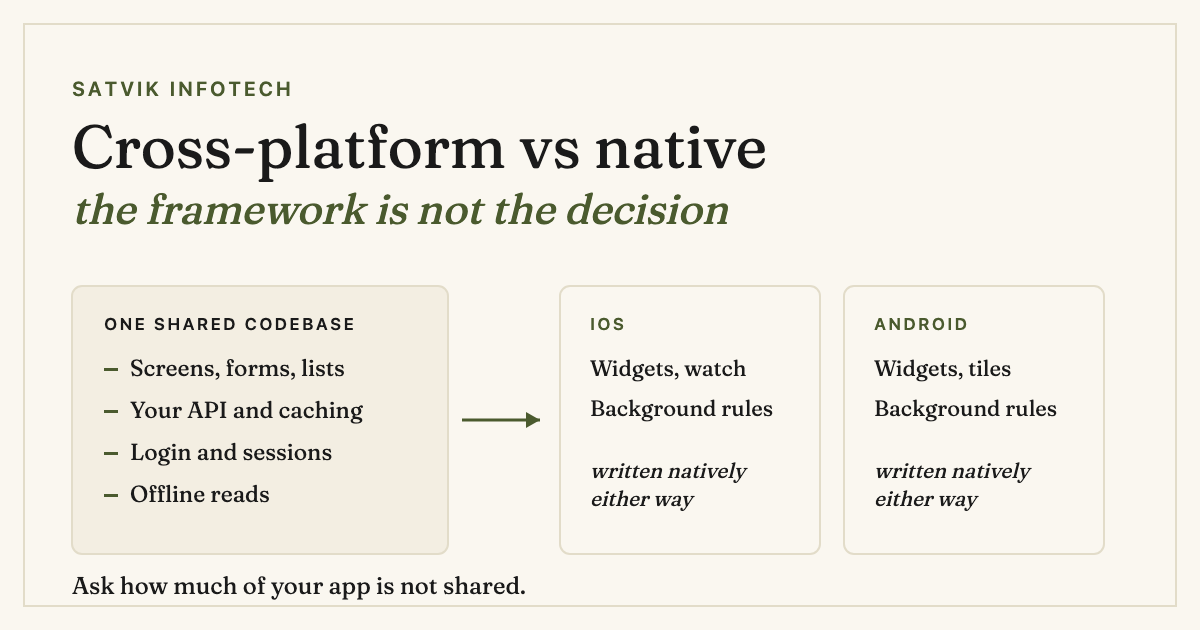
For most business apps, one cross-platform codebase is the right answer, and the framework you pick matters far less than people expect. The decision is not really about React Native or Flutter or Swift. It is about how much of your app touches the parts of a phone that genuinely differ between iOS and Android.
A rough test: if you can describe your app as screens, forms, lists and an API, one codebase will carry it. If your description keeps reaching for the camera, the background, the lock screen or the sensors, the shared part shrinks and native starts paying for itself.
- Cross-platform suits apps that are mostly screens over data: booking, ordering, dashboards, internal tools, member portals.
- Native earns its extra cost when the app lives in the background, drives hardware hard, or has to feel exactly like the operating system it runs on.
- A progressive web app is enough more often than anyone selling apps will admit, and it skips both app stores entirely.
- The framework is a reversible decision. The architecture is not. Keep business logic out of the user interface layer and a later move costs weeks, not a rebuild.
This article used to recommend PhoneGap and jQuery Mobile. Both are gone, and how they died is the most useful thing on this page, because it explains which cross-platform approaches survive and which keep failing the same way.
What happened to PhoneGap and jQuery Mobile
jQuery Mobile is finished, and says so on its own front page: "jQuery Mobile is no longer supported" (jquerymobile.com, checked 22 September 2026). PhoneGap went further than deprecation. Adobe stopped developing it, and the phonegap.com domain no longer serves the project at all; it now resolves to an unrelated software download site.
But the engine underneath PhoneGap did not die. PhoneGap was a commercial wrapper around Apache Cordova, and Cordova is still being released: its blog lists Cordova Android 15.1.0 in July 2026 and a plugin patch in August 2026 (cordova.apache.org/blog, checked 22 September 2026).
So the lesson is not "cross-platform failed". It is narrower and more useful than that. PhoneGap and jQuery Mobile both worked by putting a website inside an app shell.
Every button was an HTML element pretending to be a control, and users could feel it. The approaches that survived do something different: they run your logic once and draw real platform controls on each side.
That distinction is still the one that matters when someone offers you a cheap cross-platform build today. Ask what actually renders on screen.
The three ways to build a mobile app now
There are really only three, and the marketing around them is noisier than the differences.
| Route | What it suits | The catch |
|---|---|---|
| Cross-platform framework (React Native, Flutter) | Apps that are mostly screens over an API. One team, one codebase, both stores. | Anything the framework has not wrapped yet needs native code written twice anyway, and you inherit the framework's upgrade schedule. |
| Native (Swift, Kotlin) | Background work, heavy hardware use, and anything where feeling exactly right is the product. | Two codebases, two release cycles, and usually two skill sets to hire or contract for. |
| Progressive web app | Tools people use at a desk or on a phone browser, where an install is a barrier rather than a feature. | No app store presence, weaker background and notification support, and some buyers simply expect an icon. |
The old web-in-a-shell approach is a fourth option that still gets sold, usually cheaply. It is the one that produced the apps people quietly stopped opening, and it is the reason this article needed rewriting at all.
The question that actually decides it
Stop comparing frameworks and inventory your app instead. For each thing it does, ask whether iOS and Android behave the same way. The answer is yes far more often than the debate suggests.
| What the app does | Do the platforms differ? | Effect on a shared codebase |
|---|---|---|
| Screens, forms, lists, navigation | Barely | Fully shared. This is most of most apps. |
| Calling your own API, caching, offline reads | No | Fully shared. |
| Login, including social and biometric sign-in | A little | Shared, with a well-trodden plugin per platform. |
| Push notifications | Yes, in setup and permissions | Shared code, but two sets of configuration and two review processes. |
| Camera, photos, file pickers | Yes, in permissions and UI | Mostly shared. Expect platform-specific handling of refusals. |
| Background location, activity tracking | Substantially | Where shared codebases start to hurt. Both platforms police this hard and differently. |
| Widgets, watch apps, lock-screen surfaces | Completely | Written natively per platform regardless of what you chose. |
| Payments and in-app purchase | Yes, by store rule | Shared code, but the commercial rules differ and can change the product. |
Run that list against your own app and the answer usually appears without an argument. Six of the eight rows are shared or mostly shared for a typical business app, which is why cross-platform has become the sensible default rather than the compromise it was in the PhoneGap era.
When a progressive web app is enough
The most expensive mistake in this whole decision is not picking the wrong framework. It is building a native app when nobody needed to install anything.
If your app is used at a desk, or a few times a month, or by staff rather than customers, an install is friction you are paying to create. A web app reaches every device from one build, updates the moment you deploy, and never waits on a store review. That is the same reasoning behind turning a design into a working front end rather than treating web and mobile as separate projects.
The honest limits: background behaviour and notifications remain weaker on the web, iOS in particular restricts what a web app may do while closed, and some buyers treat "is it in the App Store" as a credibility question rather than a technical one. Those are real, and they are the reasons to build an app rather than a vague preference for one.
Where AI helps, and where it does not
AI has genuinely changed the economics of the shared-codebase argument, though not in the way the tooling adverts suggest.
What it does well is the volume work: scaffolding screens from a design, writing the boring adapters between your API and your models, generating tests, and translating a component from one framework's idioms to another's.
That last one quietly weakens the lock-in argument against cross-platform, because moving is no longer a from-scratch rewrite. Our own AI app development work leans on exactly that to keep early builds cheap without committing you to a dead end.
What it does not do is decide. A model will happily generate a background-location implementation that passes review on neither store, because nothing in the prompt told it that Apple and Google police that differently.
The platform rules, the permission copy and the store submission are still judgement, and they are where app projects actually stall. The same split shows up in AI-first app development generally: the model drafts, a person decides anything final.
It also does not shorten the parts that are waiting. Review queues, device testing and beta feedback take what they take, which is most of what determines how long an AI app takes to build.
The cost nobody quotes for
Both routes are quoted as a build. Neither is a build.
An app that ships is an app that now has two operating systems releasing major versions every year underneath it, a framework releasing under that, and stores changing their rules independently of both. A cross-platform app carries one upgrade treadmill; two native apps carry two, staggered. This is the honest argument for a shared codebase and it has nothing to do with the initial quote.
It is also why we sell ongoing maintenance as its own thing rather than folding it into a build price. An app left alone for eighteen months is not a working app with an old look; it is usually an app that has stopped building.
The app is rarely the whole job
One pattern worth flagging, because it changes what you should build: a great many app briefs are really process briefs.
When the requirement is "our customers should be able to book, and we should know about it", the app is one surface on a process that also involves a CRM, a calendar, a confirmation, a reminder and someone's inbox. Building the surface and leaving the rest manual is how an app ends up with good reviews and no operational benefit. That work is workflow automation and CRM setup, and it usually costs less than the app it makes useful.
The same applies after launch, where the support load an app creates is often better answered by AI automation than by more screens. If you want the short version of how we approach any of this before talking to anyone, the straight answers page covers it. If you are still shortlisting suppliers, our guide to picking an app development company is the companion to this one.
Common questions
Is cross-platform development still slower or worse than native?
Not for typical business apps. Modern cross-platform frameworks render real platform controls rather than a website in a shell, which was the actual problem with the PhoneGap generation. Performance differences show up in graphics-heavy and background-heavy apps, not in screens, forms and lists.
Should I use React Native or Flutter?
Either will build the app. The deciding factors are usually practical rather than technical: what your existing team or supplier already knows, whether you share code with a web front end, and which one has a maintained plugin for the awkward thing your app needs. Pick for the team and the plugin, not for the benchmark.
What happened to PhoneGap, and is Cordova safe to use?
Adobe stopped developing PhoneGap and its website no longer serves the project. Apache Cordova, the open source engine PhoneGap wrapped, is still actively released, with a Cordova Android release in July 2026. It remains a reasonable way to put an existing web app in a store listing, but it is not the way to build an app that should feel native.
Can we start cross-platform and go native later?
Yes, and it is a sensible way to de-risk a first release, provided you keep business logic out of the screens. If your rules, API calls and data models live in their own layer, moving one platform to native is a rewrite of the interface rather than the product. If everything lives in the components, it is a rebuild.
How much does a cross-platform app cost compared to native?
We quote per project rather than publishing a rate, because the range is driven by how many of your features fall on the platform-specific side. As a shape rather than a number: one codebase usually costs meaningfully less than two, the gap narrows the more hardware and background work is involved, and the ongoing maintenance difference is larger than the build difference.