How do you automate a workflow with Zapier?
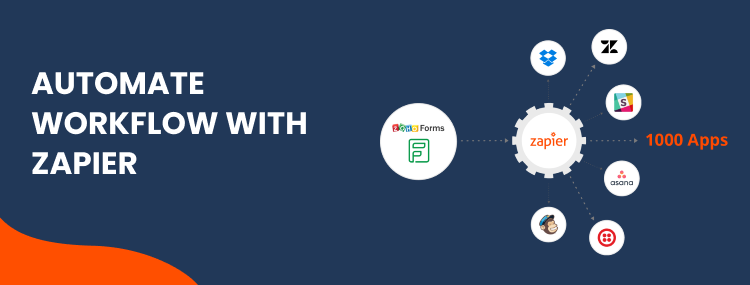
You pick one repetitive handover between two apps, set the event that should start it, tell Zapier what to do when that happens, test it against a real record, and turn it on. The whole shape is trigger, then actions.
- Choose the task that happens most often, not the one that takes longest
- Set the trigger: the thing that happens, such as a form submission or a paid invoice
- Add the actions: what should follow, in order
- Filter and format so it only runs when it should and the data arrives in the shape the next app expects
- Test with a real record, including an awkward one, before you switch it on
Pick the right first task
Most people choose wrong here, and it costs them the whole project. The instinct is to automate the job that feels most painful, which is usually a long one that happens rarely.
Frequency beats duration. A two-minute task done forty times a week is eighty minutes back and forty chances to prove the automation works. A thirty-minute task done once a quarter saves two hours a year and teaches you nothing.
The best first candidate is almost always what happens when a new enquiry arrives: create the contact, tag where it came from, send an acknowledgement. It runs constantly, it is easy to check, and the payoff shows up immediately in replies going out faster.
Building your first Zap, step by step
The interface changes from time to time, but the shape of the work does not.
- Write the sentence first. "When a form is submitted, create a contact in the CRM and send an acknowledgement." If you cannot write it in one sentence, the workflow is not ready to build.
- Connect both apps and let Zapier pull in a recent real record, so you are working with your own data rather than sample text.
- Set the trigger and check the sample it returns actually contains the fields you need. This is where most surprises appear.
- Add the first action and map the fields one at a time. Resist adding the second action until the first works.
- Add a filter so it only runs when it should, for instance ignoring internal test submissions or blank entries.
- Test with a real record, then with a deliberately awkward one: a missing surname, a phone number typed into the name field.
- Turn it on and watch it for a week before building anything else.
Step seven is the one people skip. A workflow that has run cleanly for a week against real traffic is a foundation; one that worked twice in testing is a guess.
What to check before you turn it on
| Check | Why it matters |
|---|---|
| Does it run only when it should? | Without a filter, test submissions and blank forms create real contacts and send real emails |
| Are dates and phone numbers formatted? | The next app usually expects a specific shape, and rejects or mangles anything else |
| What happens on a duplicate? | One enquiry becoming three contacts is the fastest way to lose trust in a CRM |
| Who finds out if it fails? | Zapier emails you, and that email is easy to miss for a fortnight |
| Is anything irreversible? | Sending to a customer or moving money deserves an approval step until you trust it |
The mistakes that break a first Zap
Almost every workflow that gets abandoned fails for one of four reasons, and none of them is the automation tool.
- Building five at once. Five things break together and you cannot tell which caused what.
- Testing with tidy data. Real customers leave fields blank and type their phone number into the name box.
- No filter. The workflow fires on everything, including the things it should have ignored.
- Nobody watching. It stops in week three, and nobody notices until a customer asks why they never heard back.
Where AI fits into a workflow
A plain Zap moves data. It cannot read an enquiry and work out what the person is asking for, so anything needing judgement waits for a human, and that is where the queue forms. That gap is what AI automation fills.
An AI step changes that: the workflow can read a message and route it by what it is actually about, pull details out of an attached document, or draft a reply for someone to approve.
Keep AI on the reading and drafting, and keep deterministic steps for anything irreversible. Where the judgement is the whole job rather than one step, you want AI automation rather than a linear workflow.
When to stop doing it yourself
Building your own workflows is genuinely worth doing, and for a handful of simple connections it is the right answer. There are three honest signals that you have reached the end of it.
The first is branching: once a process splits several ways, a step list becomes hard to follow and something else fits better. Our comparison of Zapier, Make and n8n covers where each one stops.
The second is volume, because Zapier bills per task and a workflow firing constantly can cost more than the tool it replaced. The third is when the workflow becomes load-bearing: if the business genuinely stops when it breaks, it needs monitoring rather than hope, which is ongoing maintenance.
At that point it becomes a build rather than a hobby, and that is Zapier integration services or the wider workflow automation we do. If the end of the workflow is a CRM that is not set up properly, start with CRM setup instead, because automating into a mess only produces a faster mess.
If you want to check where your own workflow sits before spending anything, when Zapier is not enough gives you three things to count inside it. More on what that costs and how long it takes is on our answers page.
Zapier questions, answered
Do I need to know how to code to use Zapier?
No. Zapier is built for people who do not code, and most useful workflows are assembled from menus. You hit the limit when a workflow needs custom logic or has to transform data in an unusual way, and at that point the question is whether to bring in help rather than learn to code.
How many Zaps should I start with?
One. Build it, watch it run for a week, then build the next. Starting with five means five things to debug at once, none of which you understand yet, and it is the most common reason people conclude that automation does not work for them.
What happens if a Zap runs on the wrong data?
It does exactly what you told it to, quickly, several times. That is why filters and a test run against real records matter more than the build itself. Anything that sends a message to a customer or moves money deserves a manual approval step until you trust it.
Will Zapier work with my industry software?
Check its app directory first, which is the largest of the mainstream automation tools. If your system is not listed, webhooks or its API may still work. If it has neither, no automation tool can reach it, whatever anyone tells you.
How much time does automating a workflow actually save?
It depends entirely on how often the task runs, which is why frequency matters more than how long the task takes. A two-minute job done forty times a week is worth automating; a thirty-minute job done once a quarter is usually not. Count the frequency before you count the minutes.